Data Structures
It's always confusing to know what's behind a commit. GIT tracks the whole code base. Yet we say a commit holds everything. Here I build a strong mental model of how GIT stores data inside. This also helps with branches, merges, and rebases.
GIT has two parallel data structures. Keep both in mind when you work with repositories.
- Commit History - This is just ONE acyclic graph data structure.
- Trees - There exists 1 to N trees based on different branches, different heads, etc.
Remember: All these data structures exist on the filesystem
as files inside the .git/objects directory.
The repository structure isn't stored as the same folder structure inside .git/objects.
GIT spreads the data across folders. This keeps the spread even and avoids too many files in one folder.
- Base folders are created with 2 characters. A SHA-1 hash uses 0-9 and A-F. A hash has 256 possible first two characters.
- Every hash, for a commit, a file, or a tree, starts with one of these 256 combinations.
- GIT spreads the data across these folders by the first two characters.
- The first 2 characters are the folder name and the rest is the file name.
- GIT then builds the repository structure by reading through these folders by hash.
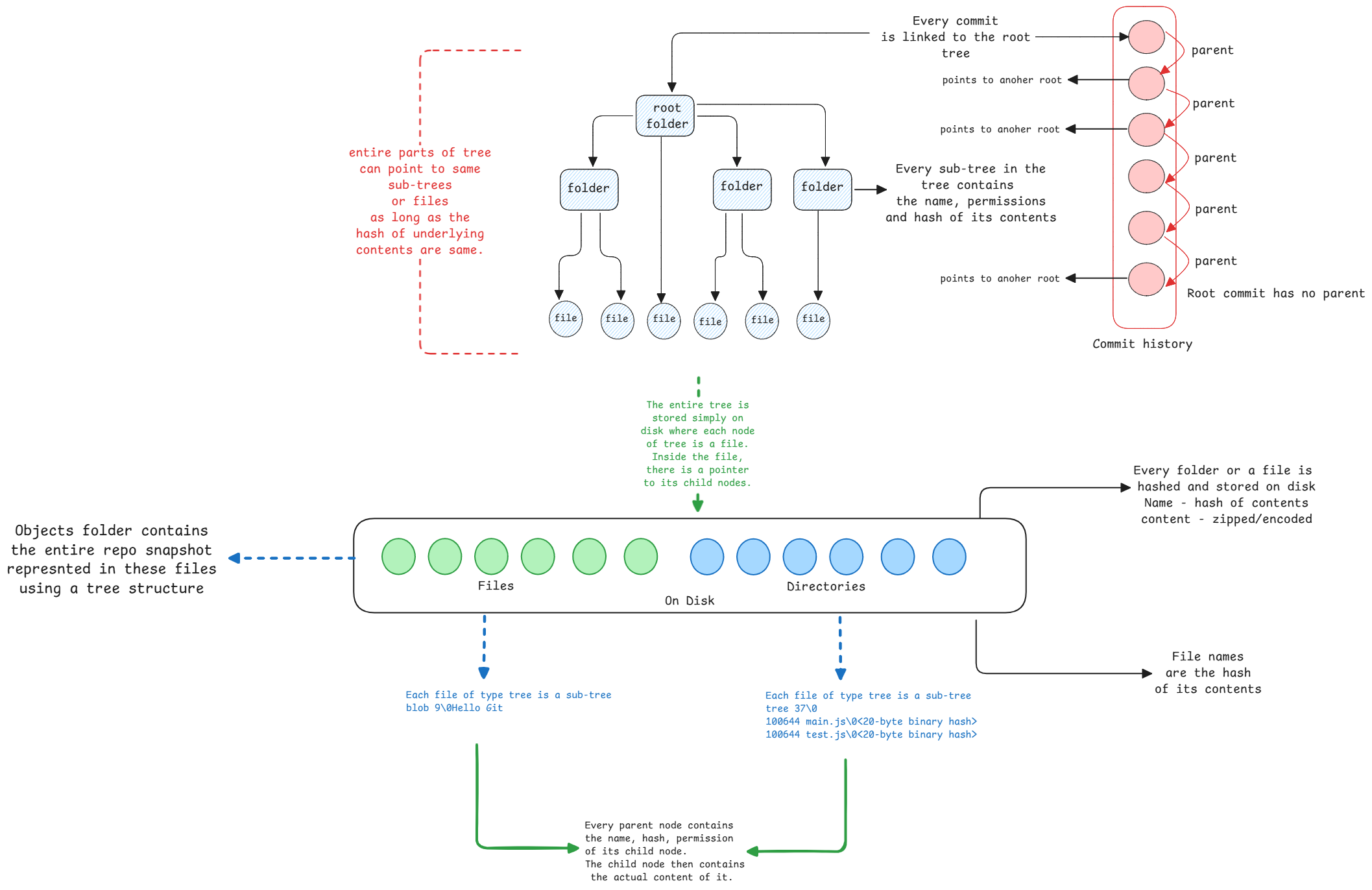
Each tree node is a file on the filesystem. It holds pointers to the objects inside it. A directory holds pointers to files and sub-directories. A pointer is just the file name of the object. GIT then looks up files by their hash names to get the next level of objects.
Every commit in GIT points to a root tree object. Every commit gets its own filesystem snapshot of the whole project.
Change any file, directory, or even just permissions, and that object's content hash changes. This change flows up to the root of the tree. New tree objects are made for all parent directories up to the root.
All other unchanged objects are reused from past commits. This shared structure makes GIT efficient in storage. And keeping full files, not just diffs, makes it fast.
Commit to tree link
Every commit object links to the root tree object. When you check out a commit, GIT gets the whole tree structure from that root.
Root commit
Every tree object is immutable. If anything in a folder changes, a file or a subdirectory, GIT creates a new tree for that folder and all parent folders up to the root.
Unchanged sub-trees are reused across commits.