Commit History
Fast Forward Merge
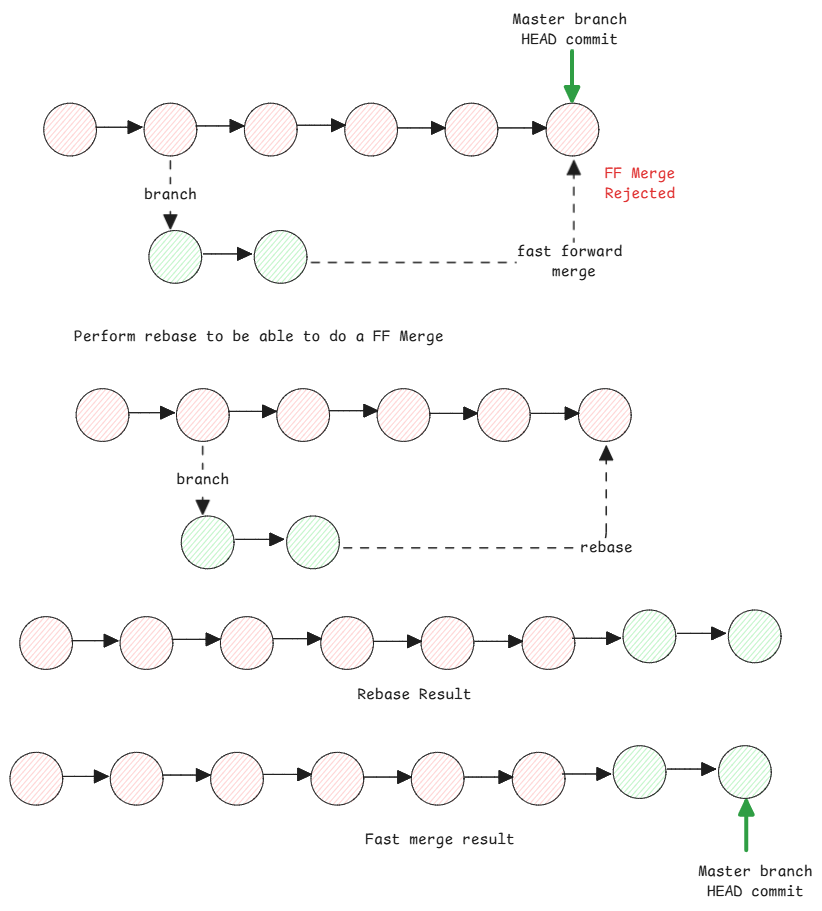
Important to know is that it's a type of merge. This means, every commit points to exactly one parent commit. Here the commits are directly added to the top most commit as it's child.
GIT will always try to do a fast forward merge if possible. This means, if there are no new commits on the target branch, it will just move the HEAD pointer to the latest commit of the source branch.
Rebase
This will move the commits from your current branch with other branch's HEAD as it's base. Doing this means, the tree structure will change and there by the commits will change.
New commits will be created with new hashes.
Commit hashes are generated based on the content of the commit and this content contains the parent commit hash and the hash of the root tree.
Rebase changes the parent commit hash, so new commits are created.
Merge Commit
This is another type of merge which handles the commit history differently. One thing to keep in mind is that the filesystem snapshot is taken as-is when such a merge is done.
In case of fast forward merge, new commits are created on top of the current branch. Meaning, a new tree is created based on the filesystem state.
For a merge commit, the commits are merged as it is. Meaning the commit what we've in the source branch are directly added to the target branch. no new commits are created.
Here it's important to note that the merge commit contains two parent commits. That's the only difference. This is then used by GIT to parse through the commit history correctly and see what commits were already merged.
After you merge a branch using merge commit, if you do more commits to it and merge it again, GIT can readily identify what commits were already merged and which new commits needs to be merged.