File Descriptor
A file descriptor is an integer. It uniquely identifies an open file or other I/O resource in a process. The kernel uses it to manage access to files, devices, pipes for IPC, sockets for the network, and more.
Essentially, anything that can be "opened" for I/O operations.
C Structures
Every thread or process has a task_struct. It has a pointer to files_struct. That's just the file descriptor table.
This table maps each file descriptor ID to a pointer to the matching file structure.
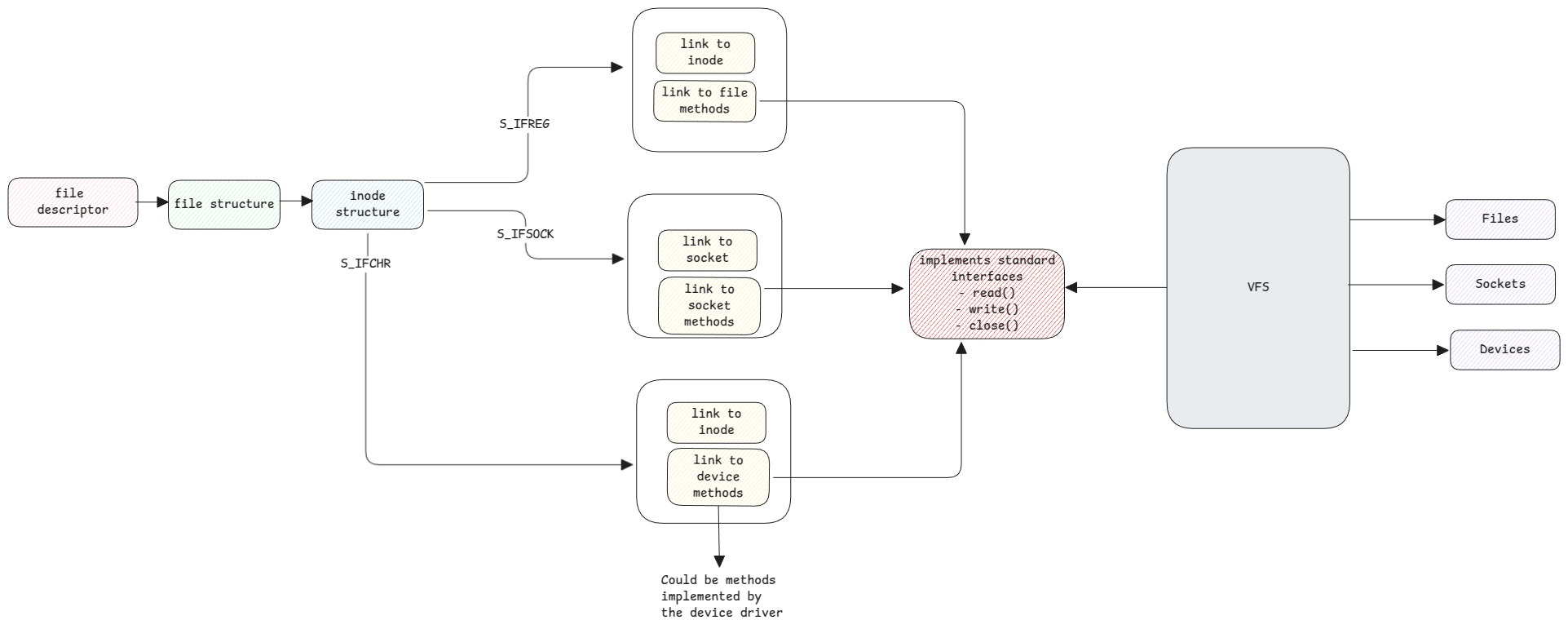
The file structure stands for an open file. It's also called the open file description. It has pointers to the matching inode structure. It also has pointers to the operations you can run on it.
One file can have many file structures if it's opened many times. This helps when many processes read the same file from different offsets.
This file structure holds all the key data. For example, the device's major and minor number, the file location, the file operations, the permissions, and the pointer to the file's inode structure.
File descriptors are C objects. The kernel creates them and keeps them in its memory. Just for uniformity, these values are also written to the file system under /proc.

This is why userspace apps must close files. If not, the file descriptors stay open and use memory.
Sockets
File descriptors aren't just for real files. They're used for sockets too. You use the open method to get a file's descriptor. In the same way, you use the socket() method to get a socket's descriptor.
For sockets, the inode structure holds the source IP and port, the destination IP and port, the protocol, and more. Both the client and server socket file structures need this.
Sockets are treated as another file. But network devices aren't treated as block or character devices. The reason is that network adapters work differently and use packets to communicate.
Device Files
These are files in the /dev directory. They hold no data. Their metadata holds only the major and minor number. That number picks the device driver for the device.
This includes character files like keyboards, mice, printers, and terminals. It also includes block devices like hard disks, RAM, CD/DVD, and USB.
More information can be found at virtual file systems.
Any read or write to a device goes through the device file in /dev. VFS uses the major and minor number there to find the device driver. It then runs methods on the device.
Device Drivers
Every device driver must implement certain API methods set by the kernel. To talk to a device, userspace or kernel apps call these same methods.
VFS then invokes them.