Filesystems
Filesystem vs Filesystem Type
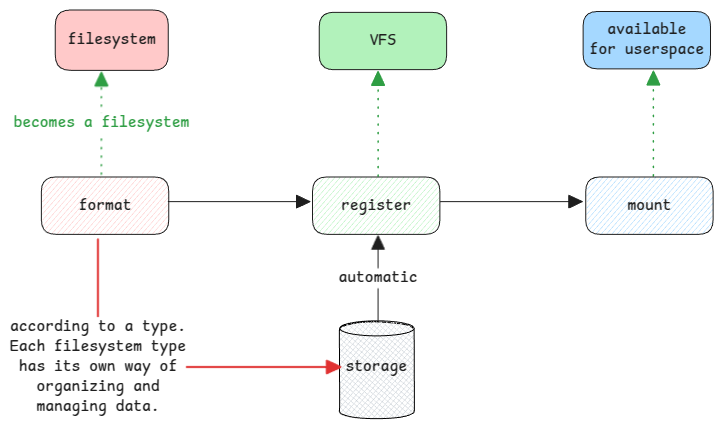
Filesystem Type is one way to store and organize data on physical storage. During formatting, the device is written with super blocks. These say how the storage is managed.
Filesystem is what a plain storage becomes after it's formatted.
The filesystem type is the class. A filesystem is an object of it.
The filesystem type software then decides how to use this plain storage.
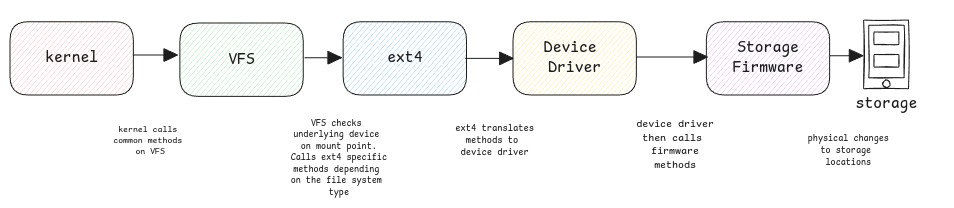
Reading data from storage
Reading a file from storage goes through many layers of software.
Preparing Disks
Formatting a disk
When you format a disk, you prepare it for a specific software. For example ext4, NTFS, or FAT. The disk's header blocks get filesystem specific information and the mount status.
It means you clear the existing data. You also create the super block and the root inode information.
For the storage, the super block and the rest just sit in a normal place. They have no special meaning for the hardware itself.
Map filesystems to mount points
The fstab file maps each filesystem to a directory in the full file hierarchy.
It shows which storage is mounted at which directory.
When the system boots, it detects all the hardware. It uses the data in /etc/fstab to mount them to directories. Based on the filesystem type listed there, the VFS talks to the storage system. It then gets the files and directories.
Mounting a filesystem
The filesystem information always lives in the OS files. This holds whether or not the disk is present. The files become reachable only after you mount the disk. They sit at the address in the inode structure.
Mounting a filesystem just means its storage is now open for the kernel to access.
Storage Software
Device Drivers
These are the common methods the filesystem code calls, such as ext4 or NTFS. They work for any device. If the disk is an SCSI disk, the SCSI driver is used.
Storage Firmware
These are the maker's methods that device drivers call. They mostly read and write data at a given block address.
Splitting Disks
Partition
You can split one physical disk into many logical disks. You can format each logical disk with a different filesystem.
This split of the physical storage is fully hidden from the storage and its firmware.
Logical Volumes
Volumes are virtual disks. Many physical disks are grouped and shown as one disk to the OS. A logical volume manager sits on top. It maps files to the underlying blocks.
Storage without a filesystem
In some cases, a disk has no filesystem. The block storage is used as it is.
For example, some databases use the block devices directly and manage the blocks themselves. The same goes for LVMs in Linux. The disks are plain block devices. The filesystems are built at the logical volume level.
Filesystem block size
It's the smallest size the filesystem uses to manage files. With a 4KB block size, even a one-letter file takes 4KB on storage. The block size is often kept equal to the physical sector size for better performance.
sectors sizes are something managed by the firmware.