Device Manager
Device managers in Linux aren't like Windows. Windows has one tool that manages all devices. Linux has different tools for different device types. Some handle block devices, some USB, some PCI. Here we see how the kernel represents devices, how they're registered, and how userspace works with them.
Software Representation
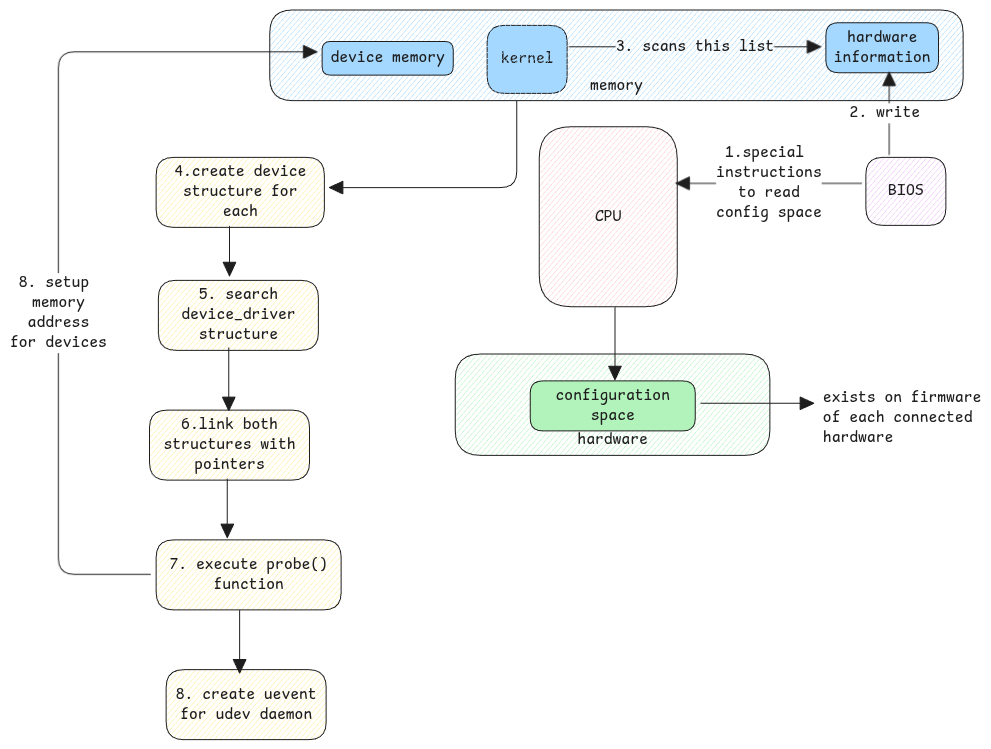
- struct
device- This is the core structure that represents a device in the Linux kernel. - struct
device_driver- This structure represents a driver that can handle a specific type
both these structures are linked together using a struct device_driver pointer in the struct device
and vice versa.
udev
udev is short for userspace device manager. It sets up each device in userspace. It lets userspace apps work with the device. It also runs any steps needed when a device is added or removed.
- When a printer is added, udev can be configured to execute scripts which will automatically add this printer to the printer list.
- Pop-up notification when a USB device is added.
- Network configuration scripts such as DHCP in case of sockets.
Ephemeral vs Persistent Namings
The kernel uses ephemeral names for devices. They don't persist across reboots. It names them in the order the BIOS detected them.
These names are simple for the kernel to handle. Still, userspace apps need persistent names to find devices across reboots. This is where udev comes in.
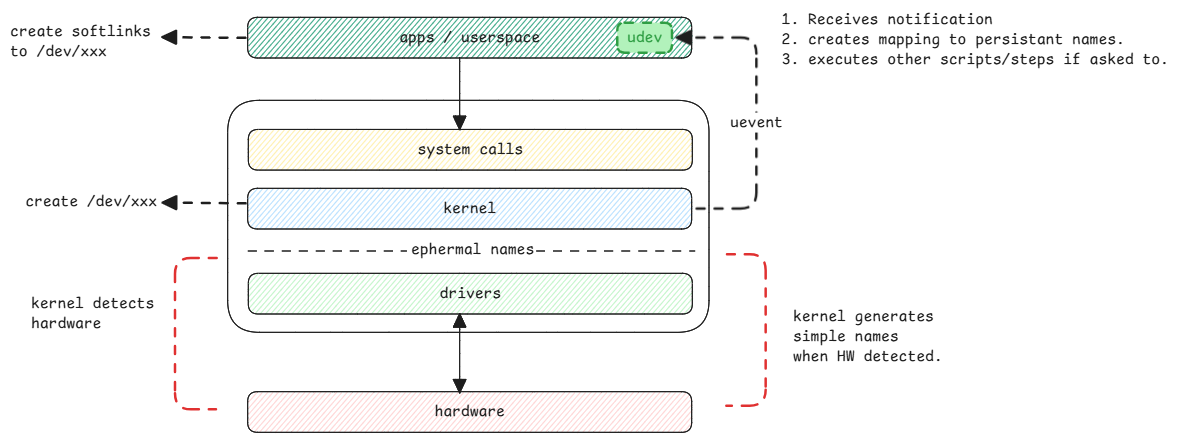
An in-built driver is part of the kernel. An external driver is loaded as a module.
Loading Persistent Information
For a disk, the UUID is read and used as the persistent name. For a network interface, the MAC address is used.
For other devices, hardware information such as vendor ID, product ID, and serial number are used to create a unique identifier.
These values stay the same across reboots. They identify the device in userspace. udev maps them to the kernel's ephemeral name from the uevent message.
All userspace applications use this persistent name to identify the device.
Note that /dev is a temporary filesystem.
The devices in /dev don't persist across reboots.
Each boot, the devices are detected again.
The /dev directory is rebuilt with the current devices.
Still, udev keeps the userspace device names consistent across reboots.
Difference between /dev and /sys file systems
Both /dev and /sys are virtual filesystems in Linux for devices. But they serve different purposes.
/dev:
- Contains device files that represent hardware devices.
- Provides a way for userspace applications to interact with devices.
- Device files are created and managed by udev.
/sys:
- Contains information about devices and their attributes.
- Provides a way to access kernel data structures related to devices.
- Used for querying and modifying device properties.
/dev/sdais a device file for a disk./sys/block/sdacontains information about the disk, such as its size, type, and other attributes.